Where ever you are in the world OziExplorer will work with your maps
and GPS receiver.
More than
20 years
Yes,
we have been developing and updating OziExplorer and related
products since 1996 and are still providing free updates for all our software
products.
This is the official web site for the OziExplorer
GPS Mapping Software which runs on your PC or laptop for trip
planning and will work with most GPS receivers for real time
tracking of GPS position (Moving Map) and Garmin, Magellan and
Lowrance GPS receivers for the upload/download of waypoints,
routes and tracks.
Program versions for :
PC computers - desktop / laptops / tablets
Android Devices - phones / tablets
Win CE Core Navigators
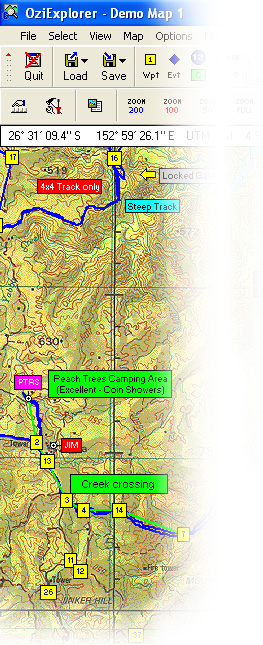
OziExplorer allows you to work with maps on the computer screen that you
create from scanned or digital maps. Ideal for planning trips for boating, 4
wheel driving, flying, hiking etc and as a real time navigation aid.
Track your position
received from a GPS in
real time on a raster
map for your region.
Maps can be either
scanned or purchased in
digital format. Uses
maps and data from PC
OziExplorer.
Using our "Screen
Designer" software on
your PC, design your own
screens and upload them
to the android tablet or
phone.
For Windows CE
navigators :
Moving map software
for Pocket PC's and
Handheld PC PDA's.
Track your position
received from a GPS in
real time on a raster
map for your region.
Maps can be either
scanned or purchased in
digital format. Uses
maps and data from PC
OziExplorer.
Using our "Screen
Designer" software on
your PC, design your own
screens and upload them
to the PDA / PND.
For PC computers :
Displays OziExplorer
maps in 3D with the
ability to rotate in all
directions and zoom in
and out of the 3D view
Supports the use of
height data in several
standard formats. With
the OziExplorer
software, a map and
height data for your
region, the map can be
viewed in 3D.
Look at OziExplorer in Español, Deutsch,
Français, Italiano, Nederlandse, Norsk, Suomalainen,
Dansk, Slovenská and Svensk, go to the OziExplorer
languages page?
See what
Optional
Extras and
Utilities we provide to extend the use of OziExplorer. For
example, see the
Optional
Extras page to download our "Map Merging Utility". This
utility will merge maps together into a mosaic and create a new
map.
Vital information at a glance:
Demonstration and Trial versions can be
downloaded.
Extensive help is included.
Upgrades are free for all products.
Platform Requirements: OziExplorer and
OziExplorer3D runs on Windows XP/Vista/7/7
Starter/8 and 8 Pro/10.
It does not run on Linux or Mac. OziExplorer Android
runs on all android versions from v2.0 to the current version. OziExplorerCE
runs on Pocket PC's and handheld PC's. It does not run on
Palm.
Maps are not included (except for example
maps), compatible maps can be obtained from many different
sources, see our maps page for possible
sources of maps.
OziExplorer cannot upload
maps to any GPS Receiver.